

| TL;DR: An llms.txt file is a Markdown file at your site’s root that points AI to your most important webpages. It can boost AI visibility, but only if it is used as a complement to strong SEO and content. We ran four experiments that confirmed this and identified hidden patterns in how llms.txt files affect AI visibility across ChatGPT, Gemini, Perplexity, and other Gen-AI platforms. |
After analyzing 137k domains, Ahrefs found that more than 38,000 websites have an llms.txt file.
Yet, there’s still no conclusive evidence that llms.txt files improve AI visibility. Even Google’s John Mueller has called them a “temporary crutch.” He says they’re useful for developer documentation, but don’t make much sense for most non-developer sites.
To find out who’s right, we ran four experiments to test whether llms.txt files actually influence AI visibility.
In this guide, we’ll walk you through each experiment, share the results, and let you decide whether implementing one is worth your time.
But first, it’s worth understanding what an llms.txt file is.
What Is an llms.txt File
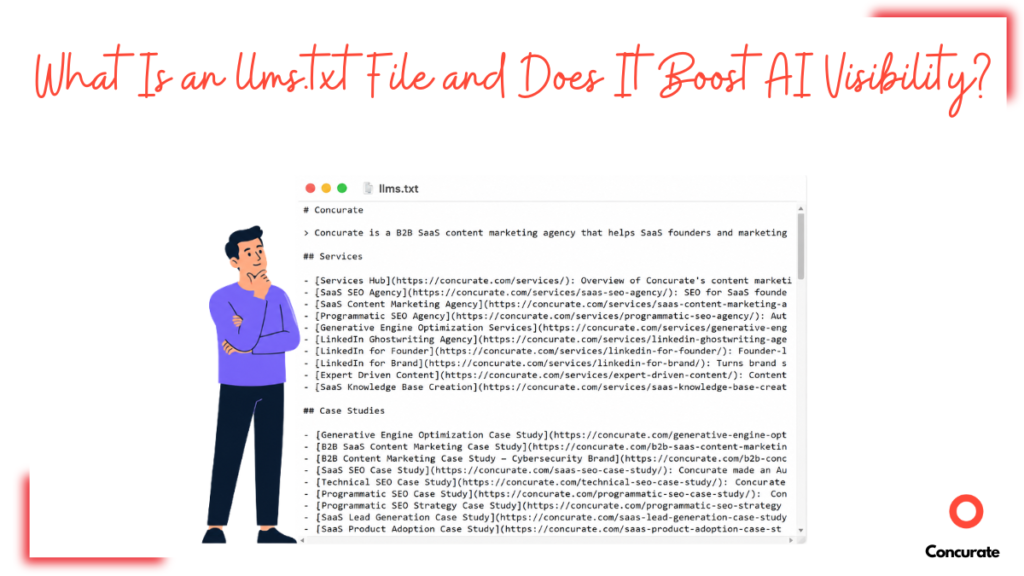
An llms.txt file is a human-readable, Markdown document that lists core pages on your website for LLMs. That way, LLMs skip reading non-useful content on your website and go straight to pages that matter for your business. The llms.txt file sits at the root of your website.
What Information Does an llms.txt File Contain
An llms.txt file typically contains a short summary of your business and a list of important web pages. Some sites also add an optional section at the bottom.
Take Concurate’s llms.txt file, for example.
It contains:
- A blockquote summary of Concurate at the top
- Core pages grouped into sections like Services, Case Studies, Company Info, and Contact
- Topic name, URL, and a short description for each page listed
- An optional section listing lower-priority pages
- Usage guidelines for how LLMs should read the document
- File version information
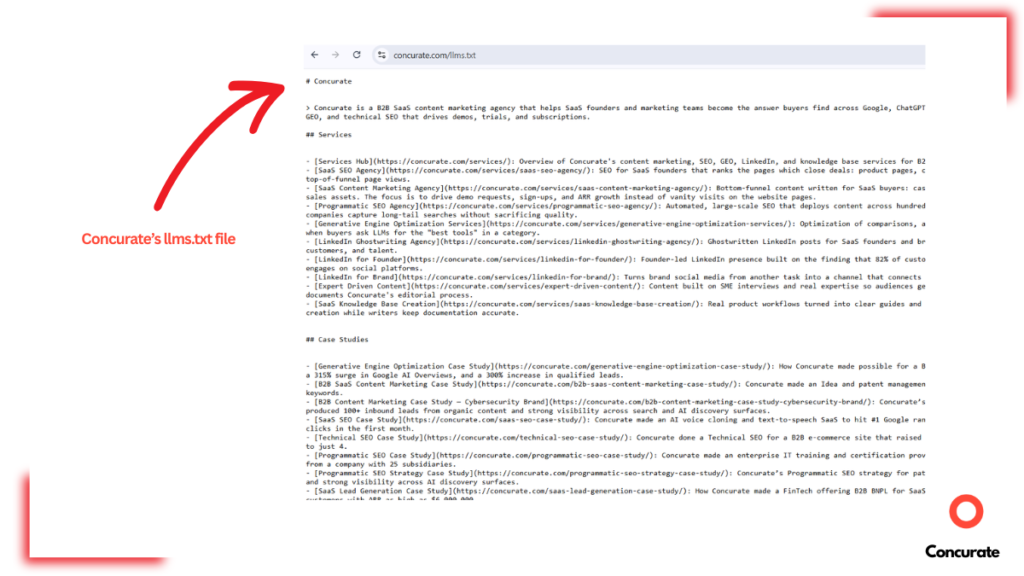
Source: Concurate’s llms.txt file
The exact sections vary by business, depending on what matters most. Triangle IP’s llms.txt file, for instance, has a dedicated section for pricing plans.
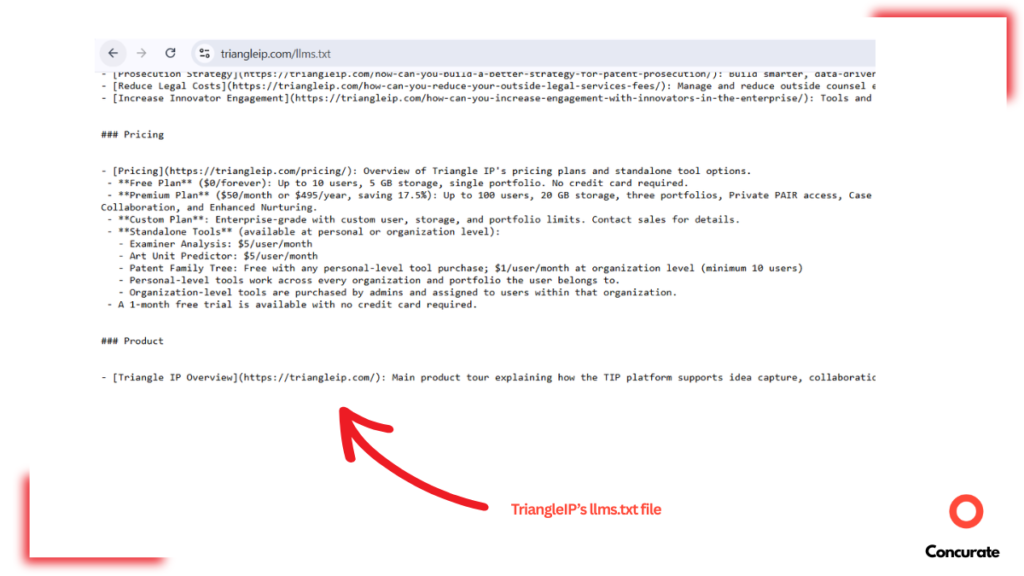
Source: TriangleIP’s llms.txt file
Don’t Mix These Up:
|
Does an llms.txt File Actually Boost AI Visibility
| 📝 Note From The Editorial Team: When we ran these experiments, HubSpot hadn’t published an llms.txt file yet. Their file is dated July 16; we had already wrapped up data collection by then. That’s why, in this article, we treat HubSpot as a brand that lacks an llms.txt file. Even leading brands that skipped llms.txt are adopting it now! |
Based on our research, we found that an llms.txt file can boost AI visibility, but not how most people think. It won’t move your rankings overnight or lift a site that’s weak on SEO.
We studied 50+ research papers on AI visibility, four of which directly covered llms.txt files. Each paper proposed a different hypothesis; some had run their own experiments. We replicated those experiments on a smaller scale to validate the results.
Here’s what we found.
1. Observation 1: llms.txt Only Enhances Technical Readiness of the Website
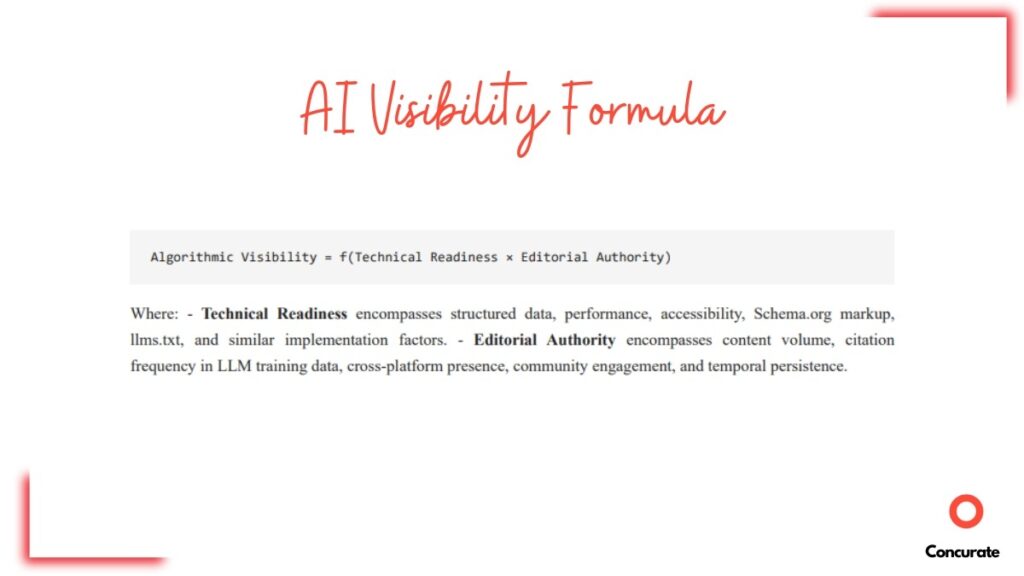
Hypothesis We Tested: The first research paper concluded with a formula on AI visibility (shown below). Basically, if either technical readiness or editorial authority of a brand is zero, their AI visibility falls to zero. Our goal was to see if this holds up in practice.
Our Experiment: We picked three competing brands: Trello, Notion, and Asana. For each, we measured two things. First, their technical readiness (do they have an llms.txt file?). Second, their editorial authority (how strong is their backlink profile?).
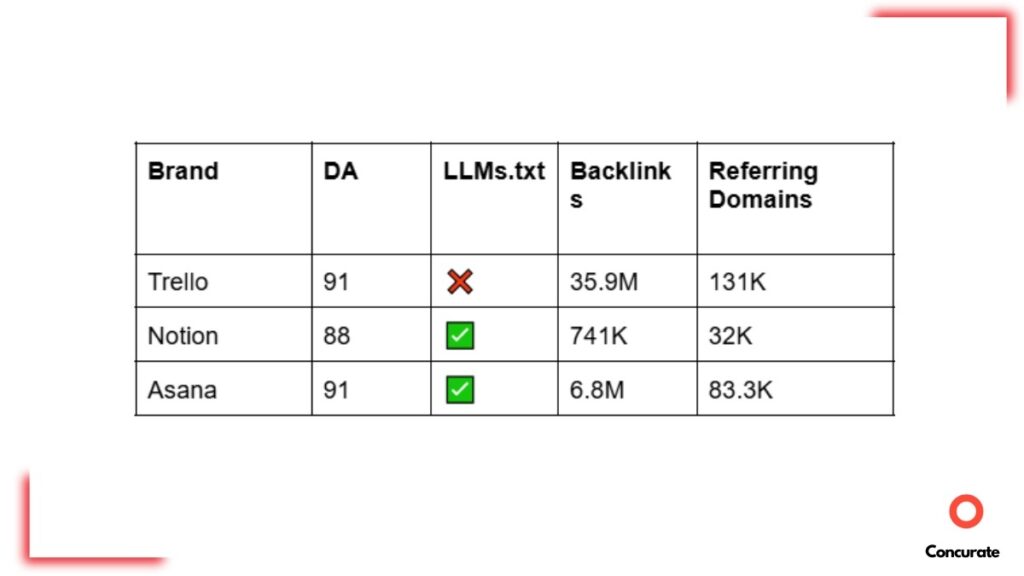
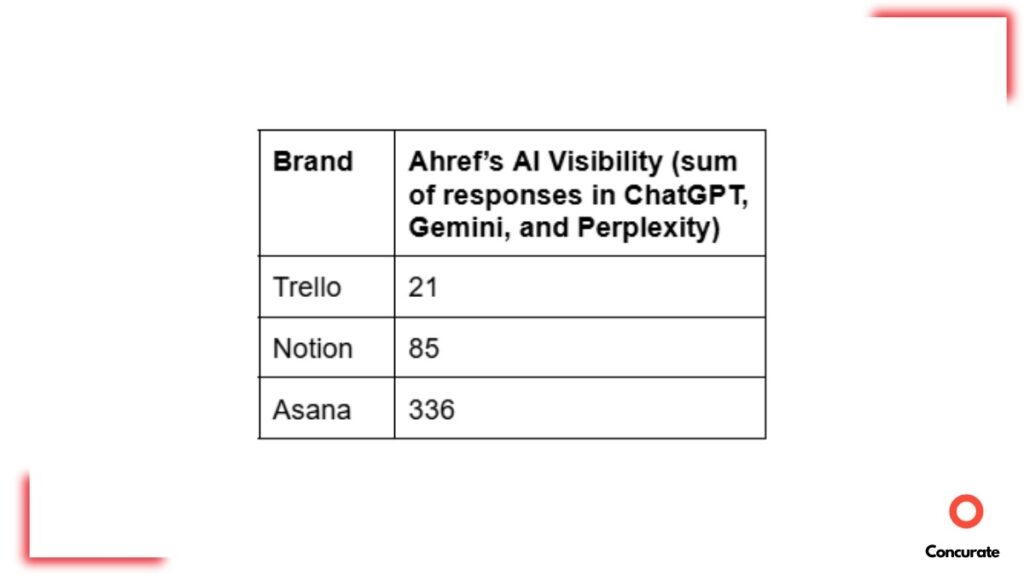
Results: Our findings lined up with the formula. Trello had the lowest AI visibility of the three, despite having the strongest backlink profile. The missing llms.txt file made its technical readiness zero. Asana ranked highest, backed by both a strong backlink profile and an llms.txt file. Notion landed in the middle.
| Key Takeaway: Create GEO-optimized content and develop strong authority (including a backlink profile). Use llms.txt to improve the technical readiness of your website. |
2. Observation 2: llms.txt Enhances AI Visibility in ChatGPT the Most, Especially During Later Stages of the Buyer’s Journey
Hypothesis We Tested: The second study proposed a six-layer framework, LLM SEO, built to increase brand mentions and domain citations across the four stages of the buyer’s journey. llms.txt files were one of the six layers. We tested the impact of llms.txt files across these stages in isolation.
Our Experiment: We compared two brands with similar DA scores: monday.com and Trello. monday.com has an llms.txt file; Trello doesn’t. We wrote prompts for each stage (awareness, interest, consideration, and purchase), and ran them through ChatGPT, Google AI Overviews, and Perplexity. Then, we counted mentions and citations for each brand.
Results: We didn’t see llms.txt files influencing answers in Perplexity and Google AI Overviews. But in ChatGPT, we saw a clear increase in brand mentions and domain citations for monday.com, especially during the consideration and purchase stages.
Here’s how each stage played out:
During the awareness stage, neither brand had much of an edge. ChatGPT mentioned/cited no brand. Perplexity leaned toward monday.com, while Google AI Overviews leaned toward Trello. There was no clear pattern yet.
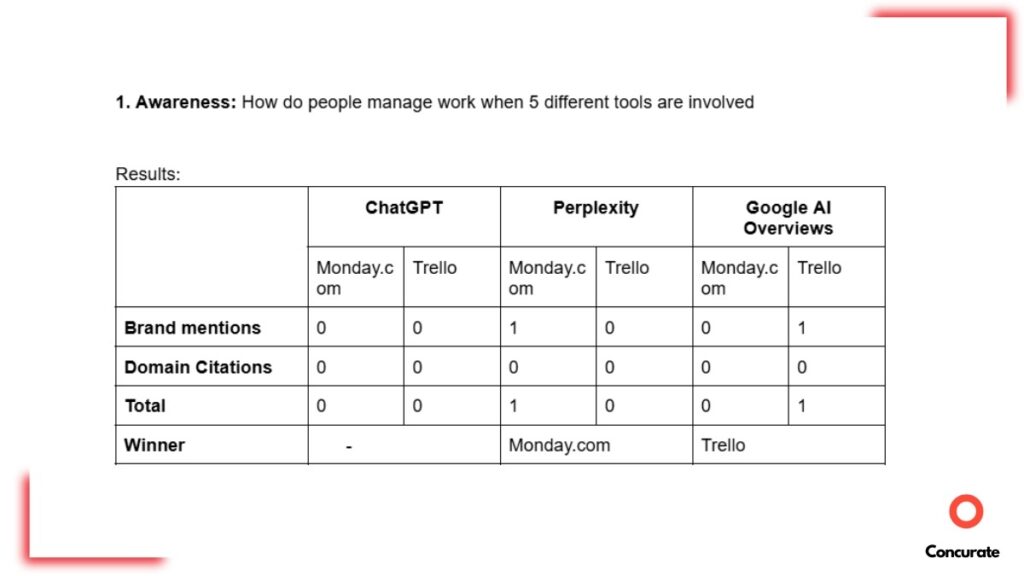
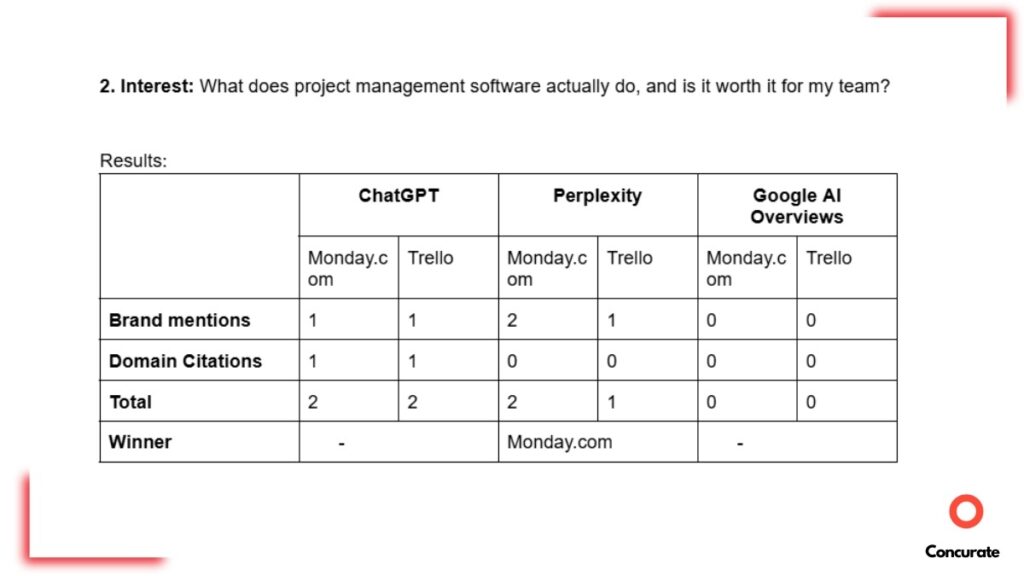
In the Interest stage, the results were still close. Neither ChatGPT nor Google AI Overviews saw a winner. Perplexity favored monday.com over Trello, but not by a huge difference.
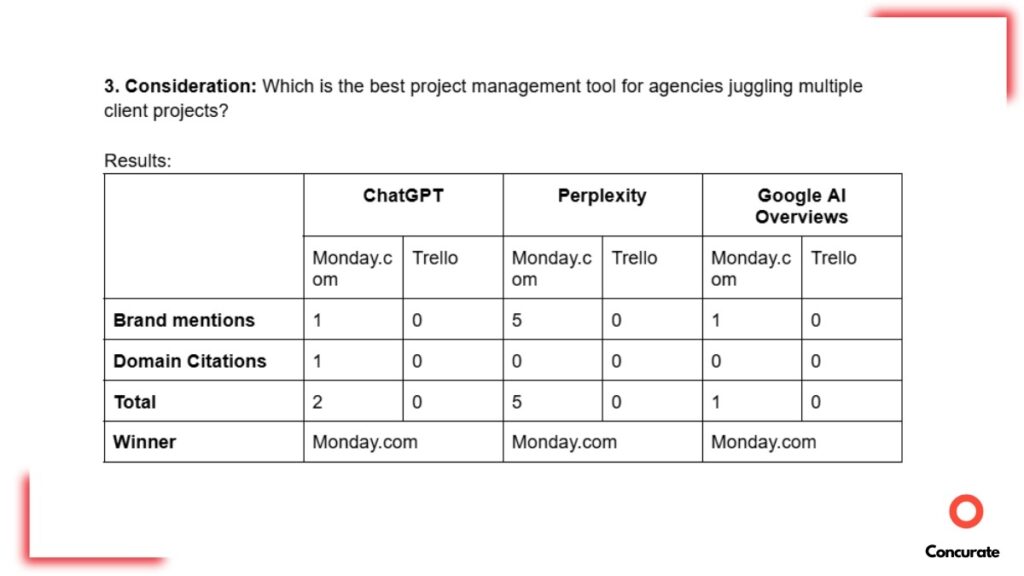
The consideration stage shifted things. monday.com had the highest brand mentions and domain citations across all three AI platforms. The difference was the greatest in Perplexity.
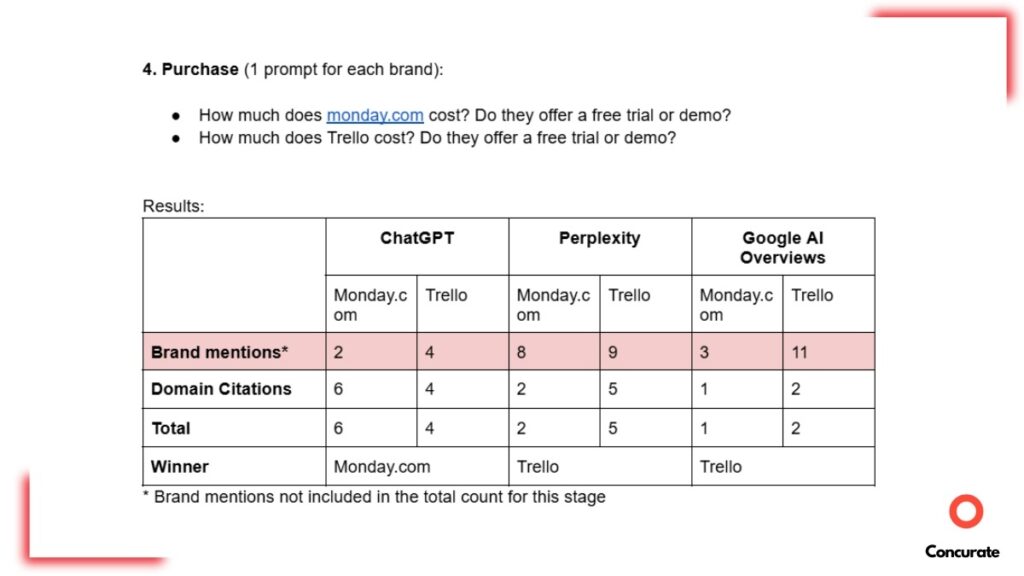
ChatGPT still mentioned and cited monday.com more during the purchase stage. While Perplexity and Google AI Overviews swung to Trello.
| Key Takeaway: Include pages in your llms.txt that help buyers at the decision-making stages. For example, comparison guides, pricing docs, product landing pages, customer case studies, ROI calculators, demo pages, etc. Especially if your ideal buyers are searching on ChatGPT. |
3. Observation 3: While AI Product/Service Recommendations Are Still Governed by SEO, llms.txt Files Can Get You Cited in the Sources
Hypothesis We Tested: The third paper argued that traditional SEO still decides whether your brand ranks higher or lower in AI recommendations. But adding an llms.txt file could improve these rankings in ChatGPT and Claude.
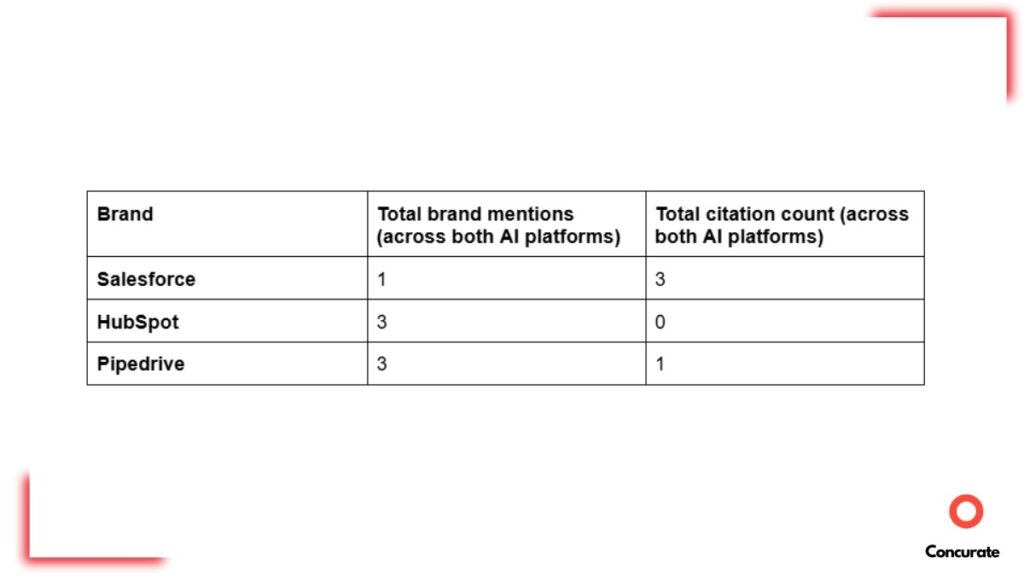
Our Experiment: We compared three competitors in the CRM space: HubSpot, Salesforce, and Pipedrive. (You can check their backlink profile and llms.txt presence in the image below.) Then we asked ChatGPT and Claude to recommend the top 3 CRM tools for a mid-sized B2B sales team.
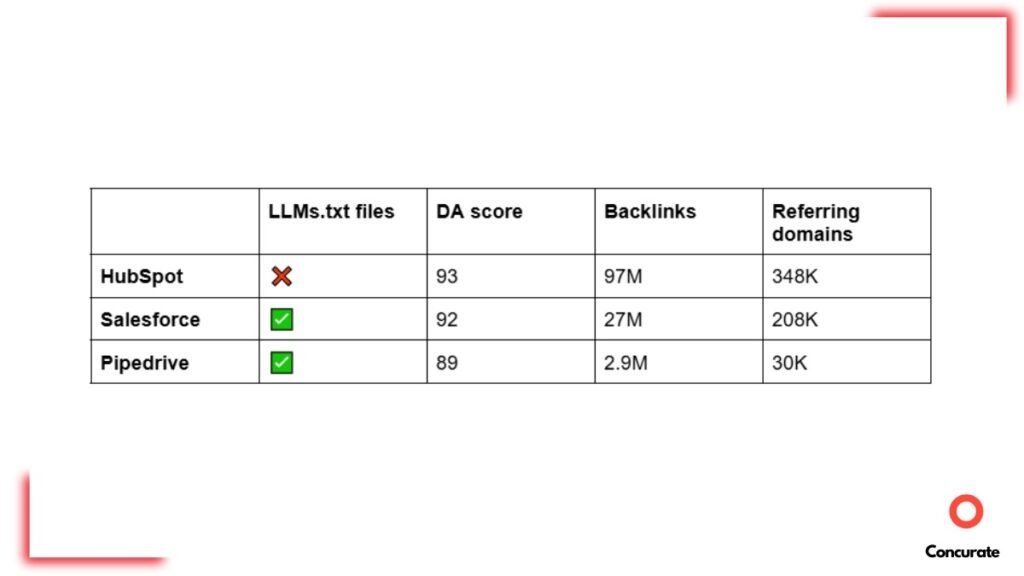
Results: ChatGPT recommended all three brands, in this order: HubSpot > Salesforce > Pipedrive. Claude’s list was: Pipedrive > HubSpot> Freshsales. So, on average, HubSpot ranks highest. And that’s because most third-party blogs name HubSpot the #1 CRM, and AI trusts that consensus.
But at the same time, Salesforce and Pipedrive show up in the citations, while HubSpot doesn’t.
| Key Takeaway: Earn third-party recommendations and backlinks. That’s what gets your brand/product/service recommended in AI answers. Use llms.txt to get URLs of your core business pages cited in AI and redirect users to your domain. |
| 💡 A Pattern Worth Noting: During this experiment, we noticed that most Salesforce URLs cited in the AI answers were actually blog posts. When we compared Salesforce’s and Pipedrive’s llms.txt files, we found Salesforce had listed links to 400+ individual blog posts. This only cemented the fact that AI tends to cite pages you explicitly point it to using llms.txt. |
Suggested Read: If you’re curious where AI tools like ChatGPT get their information from for SaaS recommendations, we broke it down here.
4. Observation 4: llms.txt Files Are Better for AEO & GEO than Plain HTML Pages and JSON-LD
Hypothesis We Tested: The fourth paper concluded that “enhanced entity” webpages (ones that include llms.txt-style instructions) get more AI visibility than plain HTML or JSON-LD pages. So, we ran a test to see if website format affects AI visibility.
HTML vs JSON-LD:
|
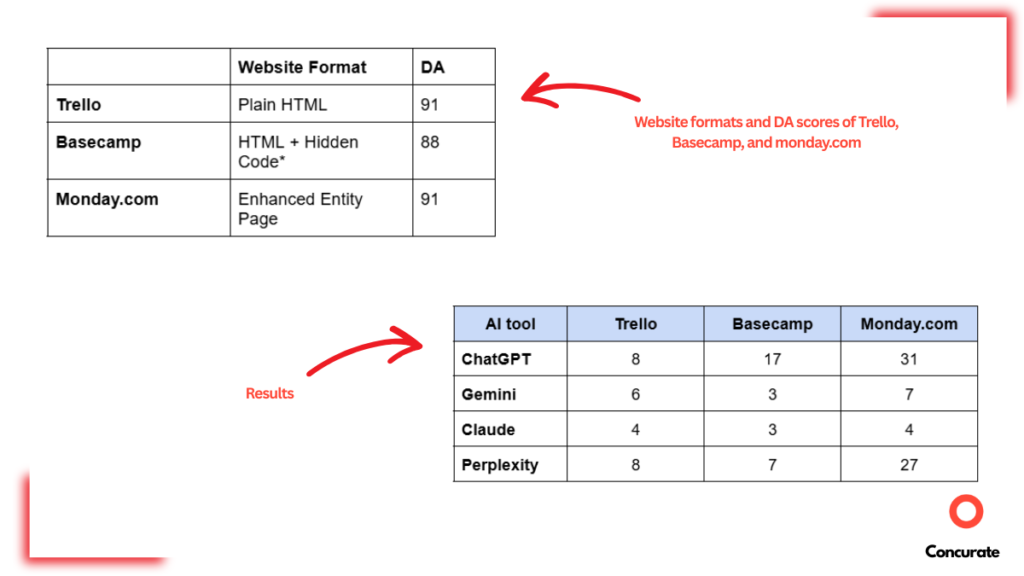
Our Experiment: We chose three brands, each using a different website format (shown below). Then, we wrote three prompts and tracked how many unique URLs from each domain the AI tool actually clicked. We ran the test across four AI tools: ChatGPT, Gemini, Claude, and Perplexity.
Results: The website format made a difference, but only on some platforms. monday.com, the only brand with an llms.txt file, earned more domain citations on both ChatGPT and Perplexity. Gemini and Claude didn’t favor any particular format.
| Key Takeaway: Add llms.txt on top of your existing JSON-LD markup. It’s a small technical update that can earn you more citations from ChatGPT and Perplexity. |
What Are Some B2B SaaS Category Leaders That Have Implemented llms.txt Files
Many B2B SaaS category leaders already use llms.txt files. This includes:
- Gen AI: Claude, Perplexity
- CRM: Salesforce, HubSpot
- AI Voice Generation: ElevenLabs, Resemble AI
- Workflow Automation: Zapier, Make
- Project Management: ClickUp, Asana
- Communication: Slack, Twilio
- Cloud Infrastructure: Cloudflare, Fastly
- FinTech: Stripe, PayPal
Perplexity even has an llms-full.txt file in place.
This matters for one simple reason: some of these companies are AI tools. If Claude and Perplexity publish their own llms.txt files, it’s a strong sign the format isn’t a dud. When implemented correctly, and alongside solid SEO, these files can boost AI visibility.
Want to see more llms.txt files? Use this llms.txt directory to browse other companies and their llms.txt files.
What Are Some Best Practices for Creating llms.txt Files
Below are some best practices for creating llms.txt files, based on our research and what leading companies are already doing:
- List each page in this format: [webpage title](URL): Short description.
- Include your priority business pages like Homepage, About Us, Contact Us, Pricing, and Book a Demo.
- Include context about your business, like industry, headquarters, core expertise, tagline, etc.
- Add LLM-friendly Markdown versions of your webpages.
- Start with at least 5-10 core links for a pilot version.
- Add an optional low-priority section. This tells LLMs which links or resources they can deprioritize.
- Add a note for AI, clarifying who your product or service is for.
- List webpages published in local/multiple languages (if you have them).
Want a step-by-step guide? Read our guide on how to create an llms.txt file.
| 📝 Note: We also noticed some brands had added non-priority pages in their llms.txt files to tell LLMs which URLs to deprioritize. This step is completely optional. |
How to Measure Whether an llms.txt File Is Boosting AI Visibility of a Website
A website’s AI visibility depends on many factors like content quality, brand authority, mentions across the web, technical readiness, and other GEO practices. That’s why it’s difficult to isolate the impact of llms.txt files on AI visibility.
However, you can come pretty close to assessing whether llms.txt is boosting your website’s AI visibility by following all four measures given below:
- Check If AI Tools Can Access Your llms.txt File: Feed your llms.txt file URL into an AI tool and ask it to fetch/analyze its contents. If it can’t read the file, either your implementation has a problem, or that particular AI tool doesn’t rely on llms.txt at all.
- Monitor AI Referral Traffic for Pages Listed in the llms.txt File: If more visitors start arriving from AI tools to the webpages listed in your llms.txt file, chances are AI is crawling and referring to those pages for answers. To learn more, read our guide on how to track traffic from AI tools.
- Analyze Citation Quality: Look at which URLs from your domain get cited in AI answers. If the pages listed in your llms.txt files are showing up more, it’s working.
- Monitor Brand/Product/Service Rankings in AI Answers: Compare how AI recommends your brand against competitors before and after adding the llms.txt file.
Brands must remember that an llms.txt file will only boost AI visibility if your content is built to be found by AI. For example, if your blog posts aren’t optimized for AI search, an llms.txt file can’t do much.
To improve the AI visibility of your content, you can use our free 13-point checklist. Grab your copy below:
How Can Concurate Help Me Improve The AI Visibility of My B2B SaaS
As our experiments showed, AI visibility comes down to two things: high-quality content and a strong website. An llms.txt file is just one piece of that. When your SEO fundamentals are already solid, a well-built llms.txt file will tip you ahead of competitors who stopped at traditional SEO. That is what Concurate is here to help you with.
Our GEO framework, Perfect Match, helps you show up exactly where your buyers are searching. We first build a detailed ICP with your sales team to understand your ideal buyer. Then, we see where you currently stand in AI answers. This is followed by a thorough content, technical, and AI visibility audit. Finally, we build the strategy to close gaps, create content built on Google’s E-E-A-T principles, and refine the strategy.
We’ve also built llms.txt files for our clients (and for our own brand, Concurate) to boost AI visibility. But we never do it in isolation. It goes hand in hand with our GEO framework.
Ready to boost AI visibility? Book your free consultation today!
Frequently Asked Questions about llms.txt Files
Still have a few questions about llms.txt files? Below, we answer the most common questions
1. Which AI Platforms Can Read llms.txt Files?
No major AI provider has officially confirmed that it uses llms.txt to fetch or rank content. That said, ChatGPT and Claude can read llms.txt files. You can test it yourself by asking either tool to analyze any published llms.txt file.
It’s also worth noting that companies like Anthropic (Claude) and Perplexity publish their own llms.txt files. That doesn’t prove they read everyone else’s, but it’s a strong signal they don’t consider the format a dead end.
2. Who First Proposed llms.txt Files, and Why?
llms.txt files were first proposed by Jeremy Howard, co-founder of Answer.AI, to reduce clutter when AI bots crawl websites. LLMs like ChatGPT, Perplexity, Claude, etc., have limited context windows. They cannot remember too much information at once. But your website is full of unnecessary stuff: navigation menus, ads, pop-ups, cookie banners, etc. This exhausts LLMs’ context limits before they reach your main content. An llms.txt file hands AI a clean version of your site.
3. What Types of Businesses or Websites Can Benefit from Implementing an llms.txt File?
Almost any site that wants to be found and understood by AI can benefit from an llms.txt file. This includes (but is not limited to):
- SaaS companies, whose buyers increasingly research and compare solutions through AI.
- E-commerce stores that want their products and category pages to rank in AI answers.
- Documentation-heavy sites, to give AI coding tools cleaner, structured reference material.
- Schools and universities, which have deep content libraries that AI can struggle to navigate.
- Personal websites and portfolios, so that an llms.txt file helps AI represent you accurately.
- GovTech companies, whose sites are often dense with policy pages and compliance details that AI might struggle to parse.
On that note, here are 9 GEO agencies for GovTech SaaS companies to get discovered in AI search.
4. How to Create an llms.txt File in WordPress?
There are two ways to create an llms.txt file directly inside WordPress:
- Use Your Existing SEO Plugin: Several SEO plugins now generate llms.txt files natively. RankMath, for example, has an “LLMS Text” module. Toggle it on and choose which pages to include in your llms.txt file.
- Use a Dedicated LLM Plugin: If you don’t use an SEO plugin, you can install a standalone llms.txt generator plugin like the llms.txt and llms-full.txt generator.
Alternatively, you can also create and optimize an llms.txt file and upload it to WordPress.
For more first-hand insights on GEO and AI search, fill out the form below to subscribe to our newsletter. A new edition comes every Friday!