
I spend a lot of time inside Google Docs. Writing, editing, reopening the same draft after a few hours, fixing things, then fixing them again. At some point, you stop catching obvious mistakes not because you don’t know better, but because you’ve seen the same lines too many times.
That’s when small errors slip through. This often leads to awkward sentences, missed commas, and something that sounds right in your head but doesn’t actually read clean.
I started using Grammarly in that exact phase of writing. Not at the start of a draft, and not to change how I write. I kept it running quietly in the background while working in Google Docs, letting it flag grammar issues, clarity problems, and tone suggestions as they came up.
Everything in this review comes from weeks of working on real drafts, real edits, and constant judgment calls about which suggestions were actually worth accepting.
First 10 Minutes With Grammarly
I didn’t really spend much time setting up Grammarly. I entered my email, logged in, and that was it. There was nothing that made me stop and figure out what to do next.
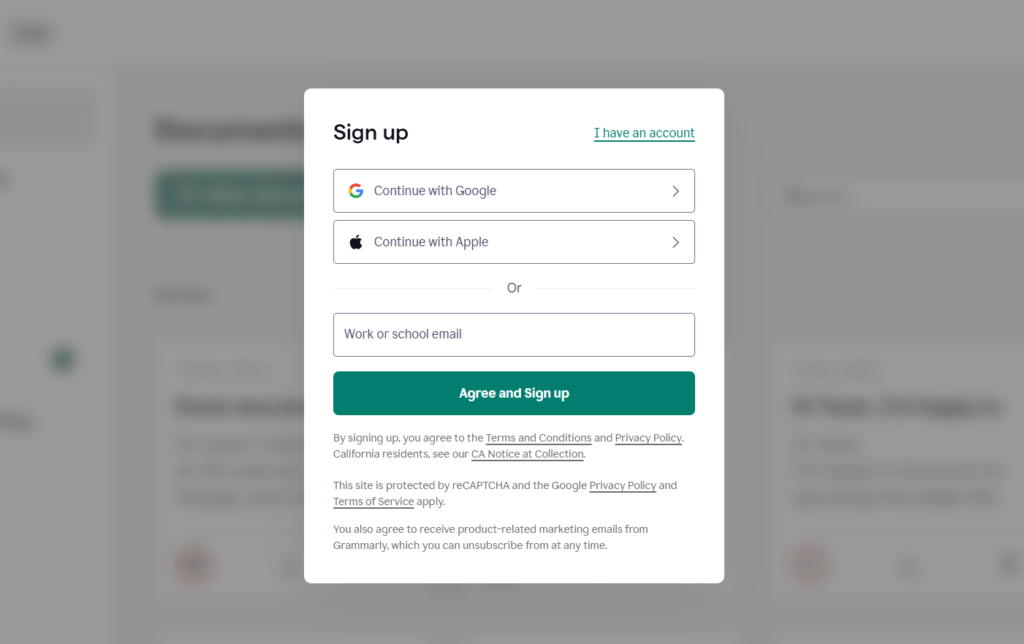
This is what Grammarly looked like while signing up.
The first thing I did was enable the Grammarly browser extension so it could run inside Google Docs. That took less than a minute. Once it was on, I went back to a document I was already working on and just continued writing.
What stood out immediately was that Grammarly didn’t pull me into a dashboard or ask me to explore features. It stayed where my writing already was. As I typed, suggestions started showing up naturally, without interrupting the flow.
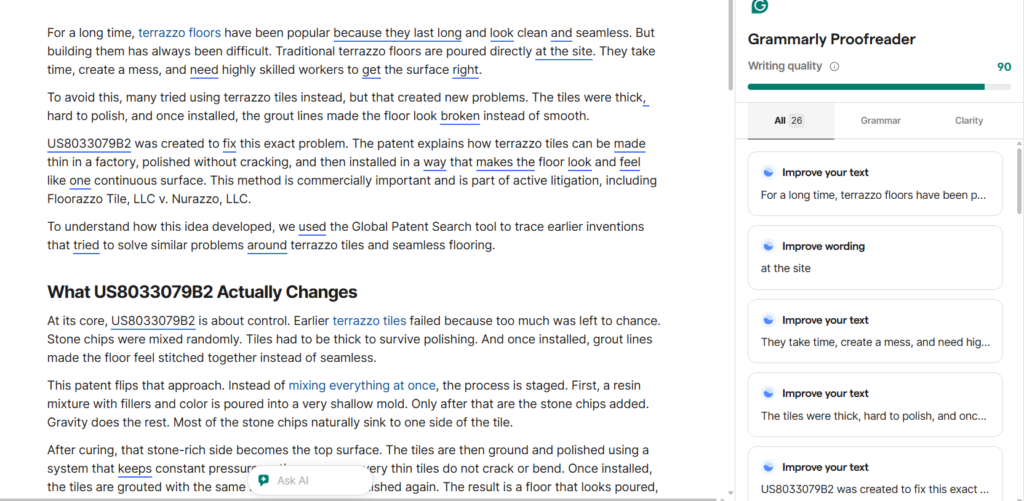
Grammarly running inside Google Docs
I didn’t have to learn how to use it. I just started writing in Google Docs, and suggestions began appearing naturally as I went. That’s usually my test for whether a tool is actually easy to use or just claims to be. If I can use it without consciously “using” it, that’s a good sign.
Those first ten minutes made one thing clear: Grammarly isn’t trying to change how you write. It’s trying to quietly fit into the way you already work.
How I Actually Used Grammarly
I didn’t use Grammarly to write anything from scratch. I used it while editing and cleaning up drafts I had already written. The use case was simple: catching grammar mistakes, small clarity issues, and things I tend to miss.
Most of my writing happened in Google Docs. Grammarly ran in the background while I worked, flagging issues as they came up. I’d glance at the suggestion, decide if it made sense, and either accept it or move on.
Here you can see the grammatical mistakes, and the score is 61
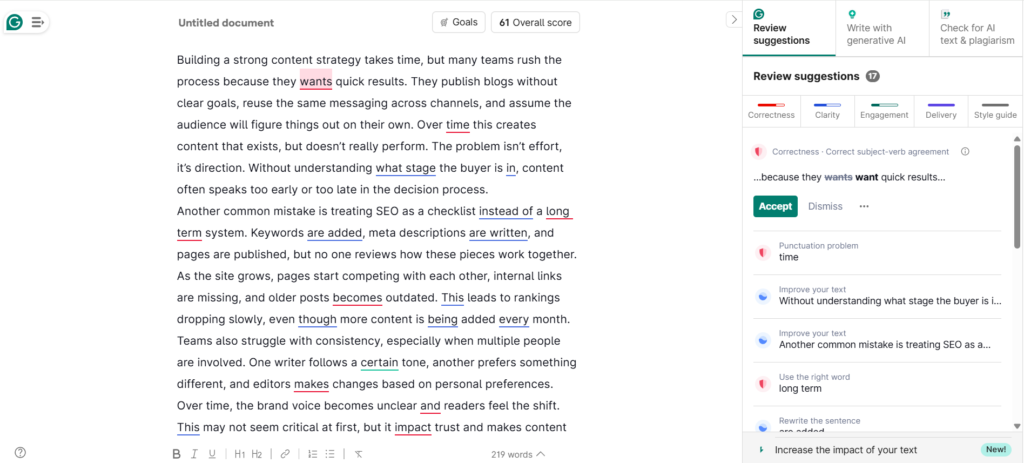
Before using Grammarly
Then I used it to fix only the grammatical errors highlighted in red. You can see the score increased to 80.
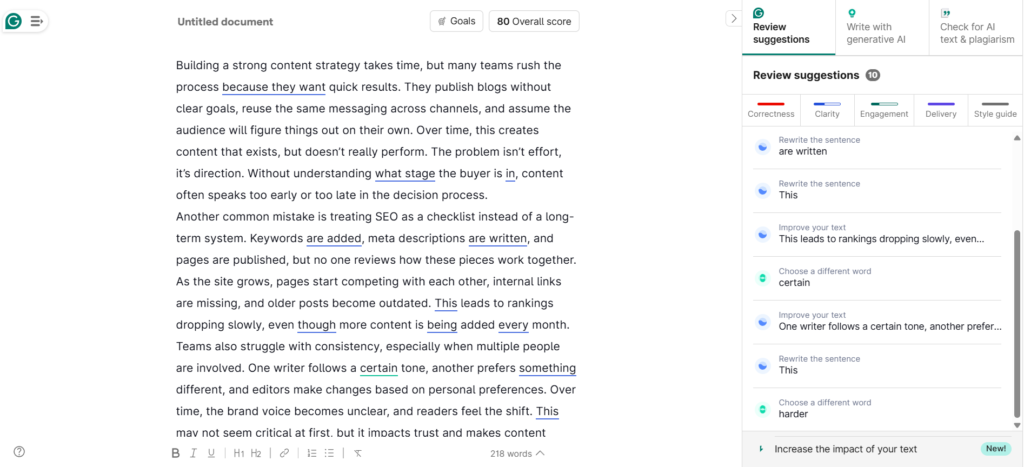
After using Grammarly
I also tested Grammarly inside the WordPress editor, mainly during final checks before publishing. The experience was similar. It caught basic errors and spacing issues, but I treated it as a last pass, not something I relied on heavily while drafting.
Across both Google Docs and WordPress, Grammarly felt consistent. It didn’t change how I worked. It just helped clean things.
So, I treated Grammarly like a safety net, not a writing assistant.
The Core Features I Ended Up Using
I didn’t use everything Grammarly offers, and honestly, I didn’t feel the need to. I kept coming back to just a few features that fit naturally into how I already write.
- Grammar Suggestions: This is what I used the most. Grammarly would underline basic grammar issues as I wrote, and most of the time, it caught small mistakes I would’ve otherwise missed. Things like extra spaces, missing articles, or sentences that technically worked but didn’t read cleanly. When you’re deep into a document, especially after multiple edits, your brain stops catching these things. Grammarly helped at that exact stage.
- Clarity Improvements: Clarity suggestions were usually a signal that a sentence had gone on for too long or felt slightly off. I didn’t always accept the suggested rewrite. Sometimes I just rewrote the sentence myself after seeing the suggestion. But it still helped because it made me pause and re-read something I would’ve otherwise skimmed past.
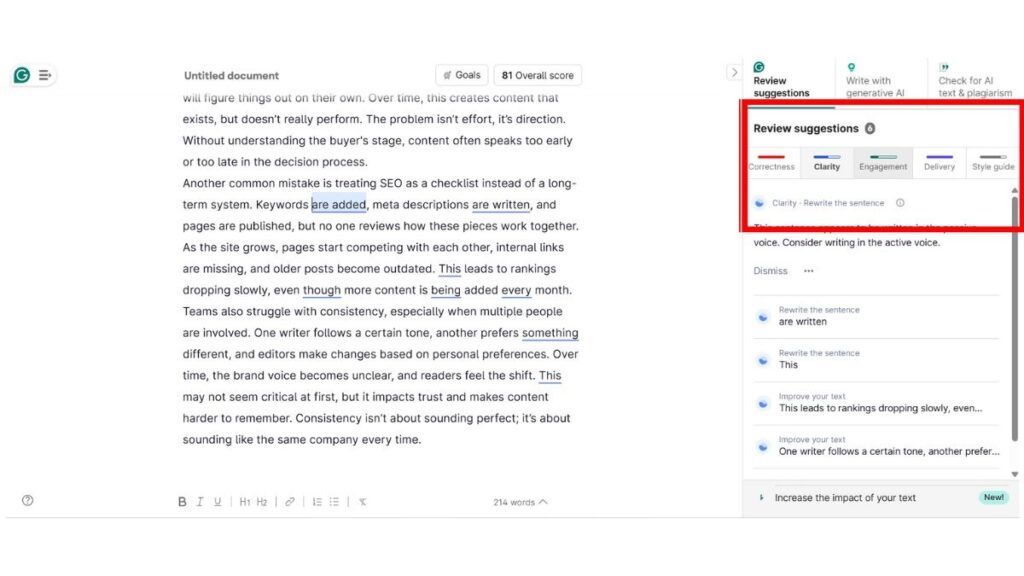
- Tone Suggestions: This was the one feature I used the least. Sometimes the tone suggestions made sense, especially for very neutral writing. But most of the time, they didn’t really match how I wanted to sound. The sentence wasn’t wrong, it just didn’t feel like me. I usually ended up ignoring these suggestions and trusting my own judgment instead.
Features Grammarly offers, but I didn’t rely on in my workflow
Grammarly does offer more than what I’ve talked about so far. I’m mentioning these briefly because they exist, but they weren’t part of my regular workflow.
There’s an AI writing and rewrite feature, where Grammarly can generate or expand content for you. I tried it once or twice, but it’s not how I prefer to write. I usually come in with my own draft and just want help cleaning it up, not replacing it.
It also has an AI chat-style assistant and a plagiarism checker. The plagiarism feature can be useful in academic or compliance-heavy environments, but for day-to-day writing, I didn’t find myself opening it.
These features might matter a lot to some users. For me, Grammarly worked best when I treated it as a background editor, not a writing tool.
Where Grammarly Started to Frustrate Me
After a point, Grammarly started doing what most tools do when you use them too much. It tried to help even when help wasn’t needed.
Some suggestions were technically correct, but didn’t match how I wanted to say something. A sentence would already sound fine to me, but Grammarly would still push a rewrite that made it feel flatter or more generic.
The tone suggestions were the biggest miss. Sometimes they just didn’t get the intent at all. I found myself ignoring them more often than accepting them.
Here’s the example
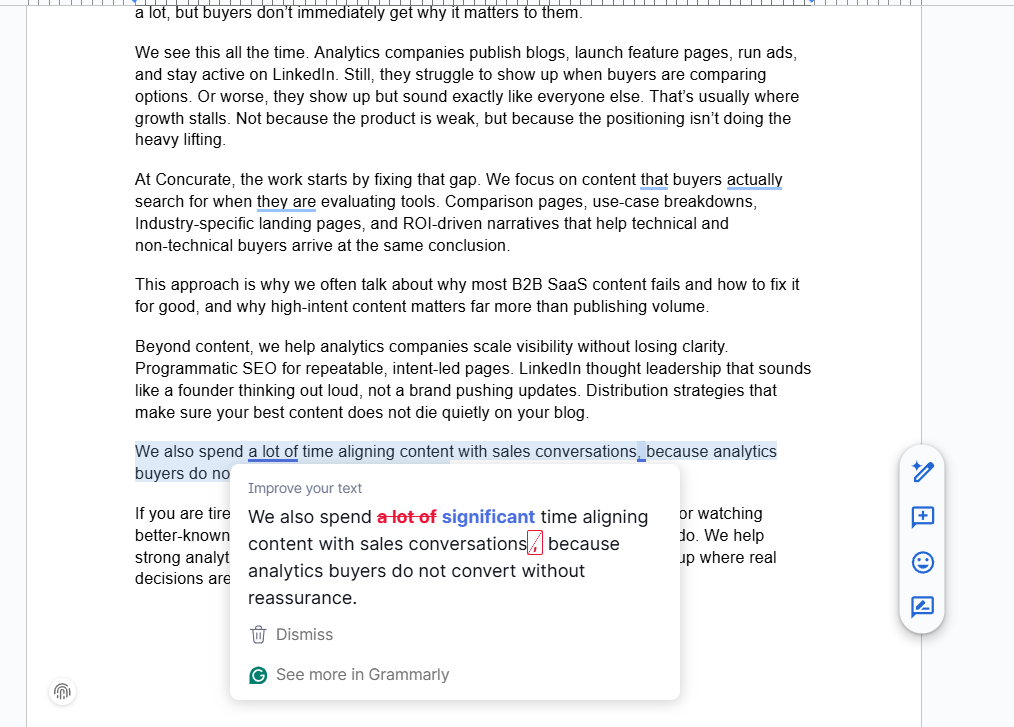
That’s when I realised Grammarly works best when you treat it like a filter, not a rulebook. The moment you start accepting everything blindly, it stops helping and starts getting in the way.
This applies to most AI tools, including Napkin AI. See this Napkin AI review for where it helps and where it gets in the way.
Pros of using Grammarly
These are some of the things that worked for me:
- It catches small grammar mistakes that I genuinely stop noticing after staring at the same draft for too long.
- It works smoothly inside Google Docs and WordPress without slowing anything down.
- It doesn’t force itself into my workflow. I decide when to engage with a suggestion and when to move on.
- For quick cleanups before sharing or publishing, it saves time I’d otherwise spend rereading everything again.
Cons of using Grammarly
- Some suggestions feel unnecessary, especially when I already know what I’m trying to say.
- Tone-related suggestions often miss context and don’t always match how I want to sound.
- A few useful features sit behind the paid plan, which you only realise once you try to use them.
- If you’re not careful, accepting too many suggestions can slowly flatten your writing style.
Free vs Pro: Grammarly Pricing
I don’t use the free version of Grammarly. I’ve been using the paid plan through my organization, so my experience is based entirely on what the Premium version offers in day-to-day writing.
Here’s how Grammarly’s pricing is structured as of now:
- Grammarly Free – Basic grammar, spelling, and punctuation checks
- Grammarly Premium – Advanced grammar, clarity improvements, tone suggestions, and rewriting recommendations
- $30 per month (monthly billing)
- $144 per year (billed annually, works out to $12 per month)
- Grammarly Business
–– Team features, style guides, admin controls, and centralized billing- $15 per user per month (billed annually, minimum seats apply)
Since I’m using the paid version, features like advanced clarity suggestions and tone feedback are part of my regular workflow. That said, even on the paid plan, not every suggestion feels necessary, and I still rely on my own judgment before accepting changes.
Grammarly vs. Alternatives: What Actually Fits Day-to-Day Writing
Before picking any writing tool, it helps to see how it compares to a few realistic alternatives. I’ve kept this comparison focused on the things that actually matter in daily use.
| Feature | Grammarly (Paid plan) | Alternative A: ProWritingAid | Alternative B: Microsoft Editor |
| Pricing | Pro is listed as $30/month or $144/year per member | Premium starts around $30/month or $120/year | Advanced Editor features come via Microsoft 365. In India, Microsoft shows ₹689/month for Microsoft 365. |
| Ease of use | Very easy if you live in Google Docs. Suggestions show up while you write. | Easy, but feels heavier. More review + reports than quick clean-up. | Easiest if you already live in Word/Outlook. Web support exists, but it’s most natural inside Microsoft apps. |
| Best for | Teams or individuals who want fast, in-flow grammar + clarity checks while drafting. | People who want deeper writing feedback and don’t mind spending time reviewing style reports. | People who already pay for Microsoft 365 and want solid basics across Word and Outlook. |
| Limitations | Tone suggestions can be subjective. Works best when you treat it as a second-pass editor. | Can feel like too much tool for quick blog edits. | Not as specialized as Grammarly for style and clarity across varied writing contexts. |
| Who should pick what | Pick Grammarly if your main job is shipping clean writing fast and you want suggestions in the background. | Pick ProWritingAid if you enjoy deep editing and want detailed style insights. | Pick Microsoft Editor if you already have Microsoft 365 and just want reliable grammar support without adding another tool. |
Choose Grammarly if you want quick, reliable suggestions while writing, but a human review is better if tone and voice really matter.
So, Should You Actually Use Grammarly?
Grammarly makes sense if you write regularly and just want fewer mistakes slipping through when your brain is already tired. It’s useful for cleaning things up, catching small errors, and making drafts easier to ship without overthinking every line.
It’s not for people who want a tool to think or write for them. And it’s definitely not something you should follow blindly if tone, voice, or personality really matter in your writing.
Would I recommend it? Yes, as a support tool. Not as a replacement for judgment. If you treat Grammarly like a second set of eyes, it does its job well.