

| TL;DR – If you’re looking for an honest HeyGen review before spending a single dollar, this one is based on real usage. I used HeyGen to create 50+ product, demo, and marketing videos for a B2B SaaS client. By the end, you’ll know what worked, what got frustrating at scale, and whether HeyGen is worth it for your B2B use case or if you should look at alternatives. |
Let me tell you exactly why I tried HeyGen.
I was working on a SaaS product adoption project for a B2B SaaS client in the IP space. The founder had already recorded YouTube videos, so that part was easy.
Helpdesk walkthroughs are different. You need the product screen front and center, with real actions happening step by step. I knew the product and could script it, but I still needed his face. His time was limited, so pulling him in repeatedly wasn’t feasible.
So we decided to create his AI avatar with voice cloning. He agreed, but only if we picked the right tool. That’s when we got HeyGen as a recommendation, and honestly, it looked good enough to try. I’ll tell you why.
But before that, let me tell you this: we’ve created 50+ product videos so far.
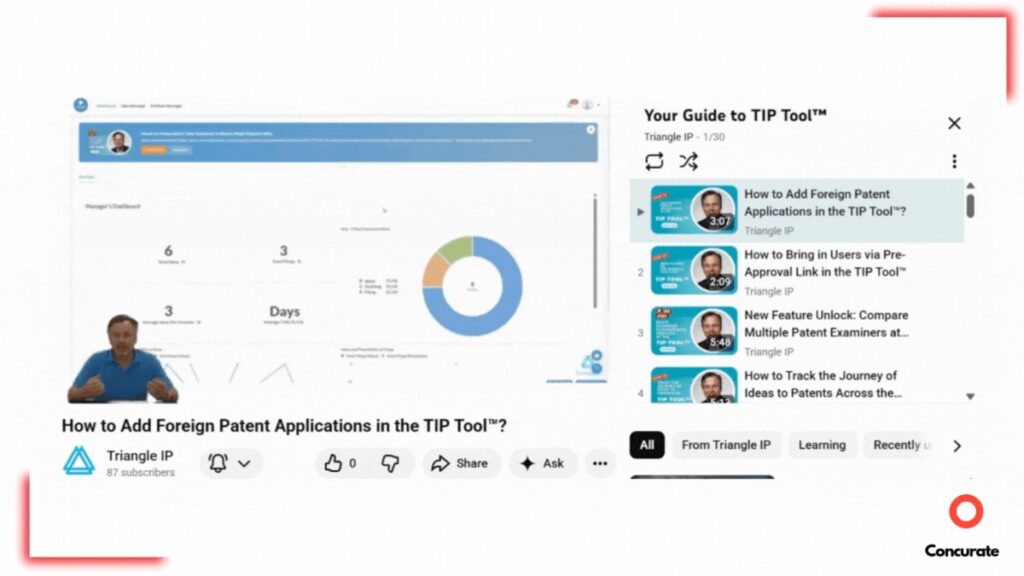
Source: Triangle IP Youtube
This hands-on experience showed me what most review sites don’t really tell you about HeyGen. That’s why I decided to share with other B2B SaaS marketers what worked, what frustrated me, and when alternatives make more sense. An honest HeyGen review, so every dollar you decide to spend is thoughtful.
Why Choose HeyGen for B2B SaaS Product Videos
I looked at HeyGen as a solution to a very specific problem: creating repeatable B2B SaaS product videos without depending on constant human recording.
HeyGen positions itself as an AI video platform built around avatars and voice cloning. The core promise is straightforward. Once an avatar and voice are set up, teams can create videos quickly, without cameras, studios, or repeated recordings.
On review platforms, ease of use comes up frequently as a positive. Many users mention that onboarding is simple and doesn’t require technical expertise. Pricing, however, is where opinions start to split. A common concern is the cost relative to usage, with several reviewers pointing out that it can feel expensive if you’re not producing videos at scale.

Source: HeyGen Review – G2
We were aware of this going in, but since we had access to a free plan and knew we would use the tool extensively, we decided to test it anyway. To see how it performed in real usage.
We took a similar approach with Napkin AI. Tested it for 8 months, creating blog visuals before committing. This Napkin AI review explains what worked and what didn’t.
The Short Test I Ran on HeyGen’s Free Plan
When I first logged into HeyGen, the platform didn’t overwhelm me. It asked one clear question upfront: which plan do you want to start with? The free plan was right there, positioned as a way to try the product before committing. I chose it.
After that, HeyGen asked a few simple questions about how I planned to use the platform. Once I answered them, I was taken straight to the dashboard. No extra setup. No friction. From there, I could start creating immediately. Avatar creation, voice options, and video projects were all accessible in one place.
I chose the free plan deliberately. On paper, it offered enough to test the core idea. One avatar and the ability to create multiple short videos. That felt sufficient for an initial experiment.
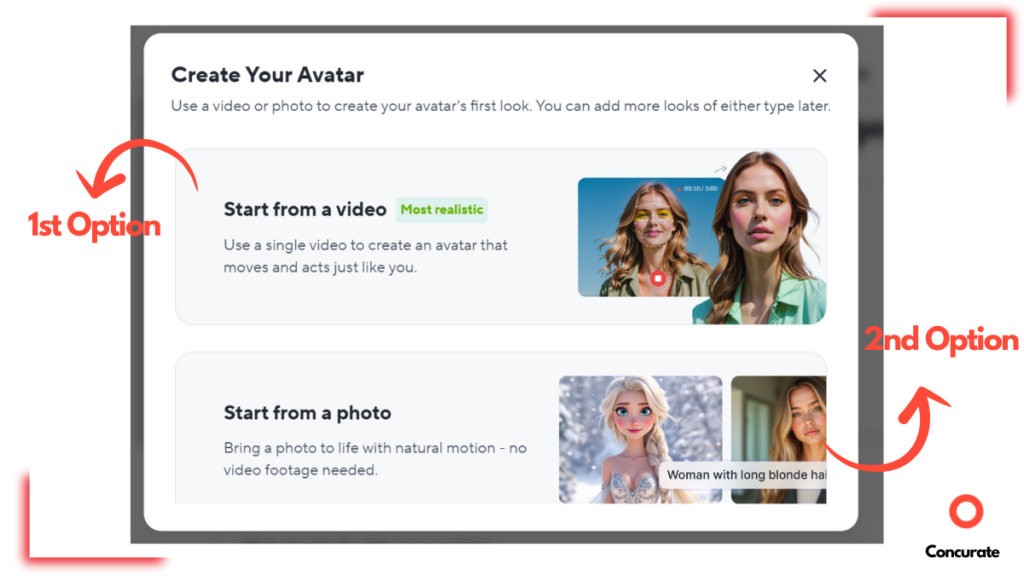
So I moved to avatar creation. HeyGen gives you two options: start from a photo or start from a video.
Source: app.heygen
I chose the video option because it’s clearly positioned as the most realistic. Uploaded a high-resolution video of our client. However, that alone wasn’t enough. The platform required explicit consent and a live verification step. Since this avatar was being created for a client, that meant we needed him on a call to complete the webcam verification. We scheduled that and finished the process.
The avatar worked. I created a demo video, and the result was genuinely good. Not perfect. Some hand gestures felt repetitive, and the likeness could be better. Plus, we need multiple avatars in different locations and positions, such as landscape or horizontal formats.
Naturally, we wanted to create a second avatar. That’s when we hit the limit. The free plan allows only one avatar.
At that point, the outcome had already done its job. The client saw the sample video. He liked the result. And that’s when we decided to upgrade and move forward. Later, I’ll explain when the free plan makes sense and when paying for HeyGen actually does.
But before that, it’s important to look at the features I actually used and how they performed for us.
The HeyGen Features I Actually Used to Create Product Videos
HeyGen offers a wide range of features, but not all of them are relevant when your goal is simple: create a reliable B2B SaaS product and expert videos at scale.
So instead of listing everything the platform can do, I’m only covering the features I actually used while creating 50+ product videos.
1. Avatar Creation (Video-Based)
This is the feature that made HeyGen usable for us in the first place.
Instead of creating an avatar from a photo, I created one from a real video of the founder. HeyGen analyzes facial movements, expressions, and posture, then recreates them in the avatar.
What surprised me here was how much the source video mattered. The avatar didn’t magically fix things. If the original recording had too much hand movement, the avatar repeated those gestures again and again. Once I re-recorded with calmer movement, the avatar looked noticeably more natural.
Here’s the part that actually mattered.
This one setup step removed the need to bring the founder back on camera every time a feature changed.
Before this, each product update meant scheduling, recording, and editing again. After the avatar was ready, I could create walkthroughs without waiting for anyone’s time.
That alone changed how fast I could ship helpdesk videos.
2. Voice Cloning
I didn’t expect this feature to matter as much as it did.
I cloned the founder’s voice and used it across all videos. Once it was set up, every script sounded like it came from the same person, even when videos were created weeks apart.

Source: app.heygen
The biggest learning came quickly.
The voice doesn’t hide weak scripts. If a script is written like documentation, the output sounds rushed and unnatural. I had to start writing scripts specifically for spoken delivery, with pauses and shorter sentences.
And not just that, the AI knows how to do its job to fix the sound quality.
Here’s what changed.
I stopped worrying about audio quality, background noise, or re-recording lines. Editing became faster because changing the script didn’t mean recording again.
For a series of 50+ videos, that consistency mattered more than anything else.
3. AI Studio (Script-to-Video Workflow)
This is where HeyGen stopped feeling like a tool and started feeling like a system.
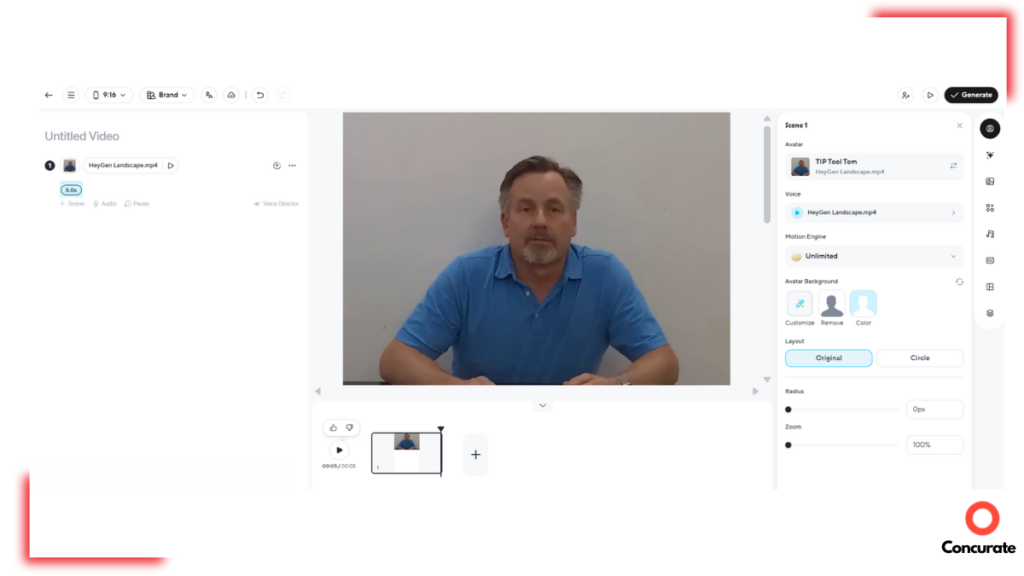
AI Studio is where everything comes together. You add your screen recording, place the avatar, paste the script, assign the voice, and generate the video.
Once this workflow was set, video creation became predictable.
Source: app.heygen.com/create
Here’s the real impact.
What used to take multiple steps across different tools became one repeatable process. Creating one YouTube video earlier usually took us two days. One day for the founder to record and share the video, and another day for editing and uploading. And that was for standard expert videos, not product videos. Product videos required even more effort from the founder. Because of time constraints, I was able to produce only one or two videos per week.
With HeyGen, I created at least two videos in a single day from scratch. That included screen recording, scripting, and then all edits to producing the final video in HeyGen. Its a ~560% increase in work efficiency.
4. Translation and Dubbing
I evaluated this feature, but didn’t rely on it heavily.
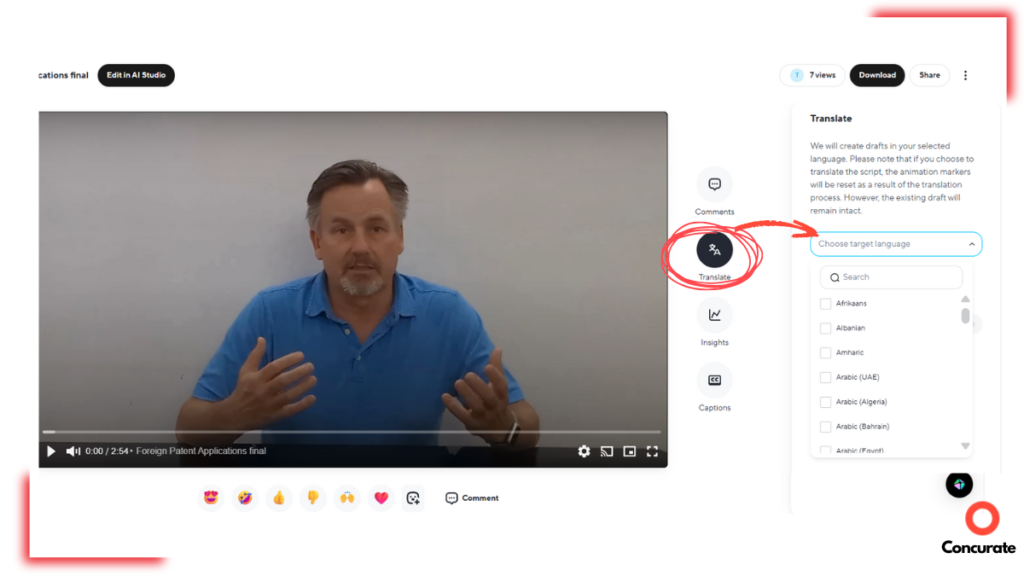
The promise is attractive: take one video and turn it into multiple languages without re-recording. For marketing content, that’s powerful.
Source: app.heygen
For product walkthroughs, accuracy is non-negotiable. A small mistranslation can confuse users quickly. Until I could fully trust the output, I decided not to use this feature for helpdesk content.
This is a feature I’d revisit later, not during the core rollout.
The Friction Points I Hit While Using HeyGen
HeyGen works well when you’re testing a few videos. The friction shows up when you start producing at scale.
Here are the main issues that consistently slowed me down:
Syncing the Script With the Screen Recording
This was the biggest time drain. The avatar doesn’t understand what’s happening on screen, so the script has to be manually timed. If the narration runs ahead or lags behind the actions, the video feels off. Fixing this meant repeated edits and regenerations, which added up fast.
Words Mispronunciation
Certain product terms and names were mispronounced. Fixing this wasn’t straightforward. We’re still relying on spelling tweaks and phonetic workarounds, and even then, results aren’t always consistent.
Pauses and Pacing
If you don’t explicitly add pauses to the script, the delivery sounds rushed. Everything comes out in one continuous flow. Writing scripts for pacing, not just clarity, became a recurring adjustment.
Repetitive Hand Movements
The avatar reuses gestures across videos. At small volumes, it’s easy to ignore. At scale, it becomes noticeable. The only real fix was re-recording the source video with minimal movement.
By the time I started running into these friction points, one question naturally came up:
Is HeyGen still the right tool for the job, or is it worth looking at alternatives? So let’s see a comparison.
HeyGen vs 2 Strong Alternatives (Quick Comparison Table)
At this stage, we’re not abandoning HeyGen. I’m actively using it, working around its limitations, and shipping videos. But when a tool becomes part of a daily workflow, it’s only responsible to pause and compare.
Here is a quick look at some of the top AI video generation alternatives of HeyGen:
| Tool | Key Features (Quick) | Best Use Cases | G2 Rating | Limitations Buyers Mention Most | Pricing (Public Entry Point) | Demo / Trial |
| HeyGen | AI avatars, voice, AI Studio, video generation; API available | Product walkthroughs, helpdesk, onboarding, marketing videos | 4.8/5 | Can get pricey depending on how you use it; trade-offs show up at scale | Free option; Creator $29/mo (annual discount mentioned) | Free plan available |
| Synthesia | Business-focused AI video creation; supports many languages; free creation path | Training, internal enablement, onboarding, explainers | 4.7/5 | Common theme in reviews: pronunciation and plan flexibility can be pain points | Starter from $18/mo | “Try free” path available |
| Colossyan | Text/docs to avatar-narrated videos; training-first positioning | Workplace learning, training, product tutorials | 4.6/5 | More “L&D/training” oriented vs marketing polish in some setups | Starter from $19/mo | Free trial available |
For me, HeyGen checks the boxes I care about. It gives the features I need to create and scale product videos without pulling people back on camera.
That doesn’t mean it’s the right choice for everyone. Your needs might be different. So let’s quickly see who needs what.
Which AI Video Tool Should You Pick for Your B2B SaaS Marketing?
Different AI video tools solve different problems. Here’s the simplest way to choose.
- HeyGen: To create product walkthroughs, helpdesk videos, demo-style content, or marketing explainers quickly. It works best when speed and repeatability matter more than creative flexibility.
- Synthesia: Better suited for enterprise training, internal communications, and compliance videos. Most public case studies focus on HR, L&D, and internal enablement, not product marketing or SaaS walkthroughs.
- Colossyan: Works for basic explainer videos and internal training, especially for small teams. It’s simpler to use but offers less customization and fewer production controls compared to larger platforms.
Each tool is different, and I know many people choose based on pricing or a long list of features. Don’t do that. Pick the tool that actually improves work efficiency and delivers outcomes worth the money you invest.
Final Verdict: Is HeyGen Worth Paying For?
After creating 50+ videos with HeyGen, here’s my honest take.
If you’re a B2B SaaS marketer producing product walkthroughs, helpdesk videos, or demo content at scale, HeyGen is worth paying for.
The biggest win is simple: you no longer depend on repeated live recordings to keep video output moving. Once the avatar and voice are ready, video creation becomes a process, not a scheduling problem.
That said, HeyGen isn’t fully hands-off. Scripts still need careful pacing, narration has to be synced with screen actions, and small production tweaks add up as volume grows. If you expect cinematic polish with zero effort, this won’t deliver.
For us, the trade-off was clear. Speed, consistency, and scalability mattered more than perfection.
One Last Thought
What changed the results for this client wasn’t a tool. It was clarity, delivered consistently.
The helpdesk videos made the product easier to understand. The written content made it easier to find. Together, they turned the help center into something more than support. It became an entry point. A trust builder. A growth lever.
That’s how we approach content at Concurate.
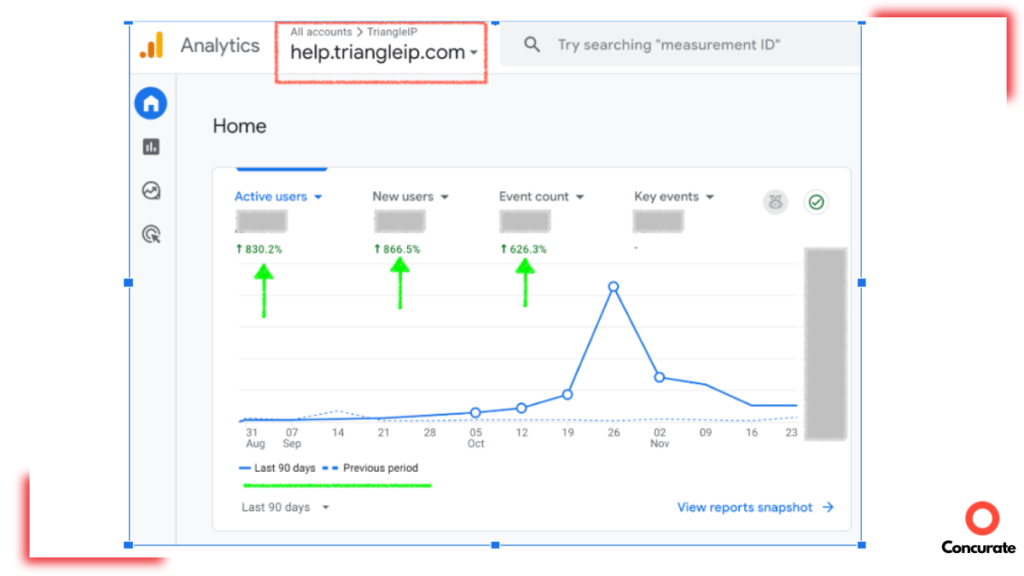
We don’t chase traffic for the sake of charts. We design systems where videos, blogs, and product education work together to drive adoption, retention, and leads. That’s how this same client crossed 500+ signups through content, and why the helpdesk now attracts real users instead of sitting quietly in the background.
Source: GA4
If you’re a B2B SaaS team looking to scale content that actually moves the business, let’s talk.
Book a 15–20 minute strategy call with Concurate. No pitches. Just a clear conversation about what will work for your SaaS.
FAQs About HeyGen Review
1. How Long Does It Realistically Take to Create a Usable AI Avatar in HeyGen?
In a real B2B SaaS setup, it usually takes a few hours to a day to get a usable avatar. This includes preparing a high-quality source video, completing consent and live verification, and testing the first output. In our case, the first avatar wasn’t perfect, and we had to iterate before it was production-ready.
2. Is HeyGen Secure and Compliant Enough for Client-Facing B2B SaaS Products?
Yes, but with conditions. HeyGen requires explicit consent and live verification from the person whose avatar is being created. That extra step can feel inconvenient, but it’s actually a safeguard. For agencies and SaaS teams working with founders or clients, this makes HeyGen safer than tools that allow avatar creation without clear approval.
3. Do AI-Generated Helpdesk Videos Actually Impact Product Adoption or Retention?
They do when paired with the right content strategy. Helpdesk videos improve clarity, reduce user friction, and make product usage easier to understand. In our case, pairing videos with search-optimized help content led to higher visibility and engagement, which supports both adoption and long-term retention.